- MyMentone app > Parent Lounge tile (bottom left)
- Direct: https://tass.mentonegrammar.net/parentlounge
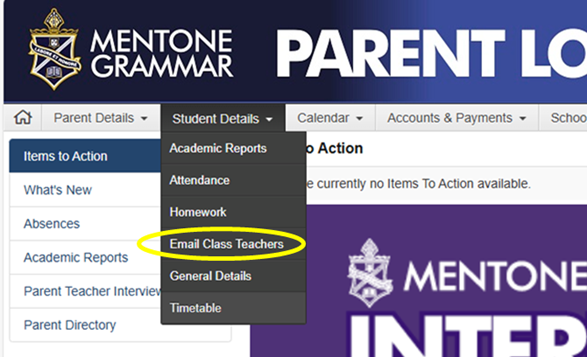
- Once logged into Parent Lounge > go to Student Details (top nav)
- Click on Email Class Teachers (highlighted in yellow circle in image) to view the list of teachers for your child
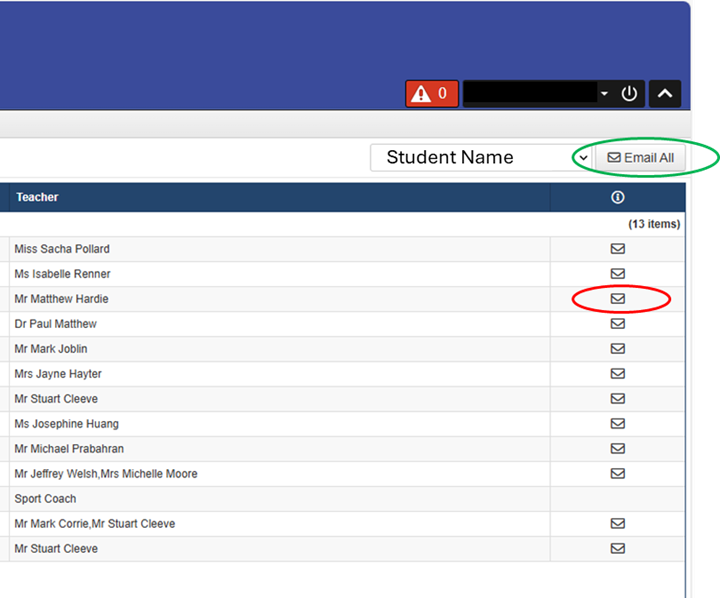
- Use the arrow [Student Name] to select the relevant child if you have more than one at the School
- Email all teachers (e.g. green circle) for a blanket message
- Email individual teachers by clicking on the relevant envelope icon (e.g. red circle)
- You can also copy the email and paste into another mail program as required
- If on mobile you may need to double click the icon and then it will ask to open in the relevant mail program on your phone.