
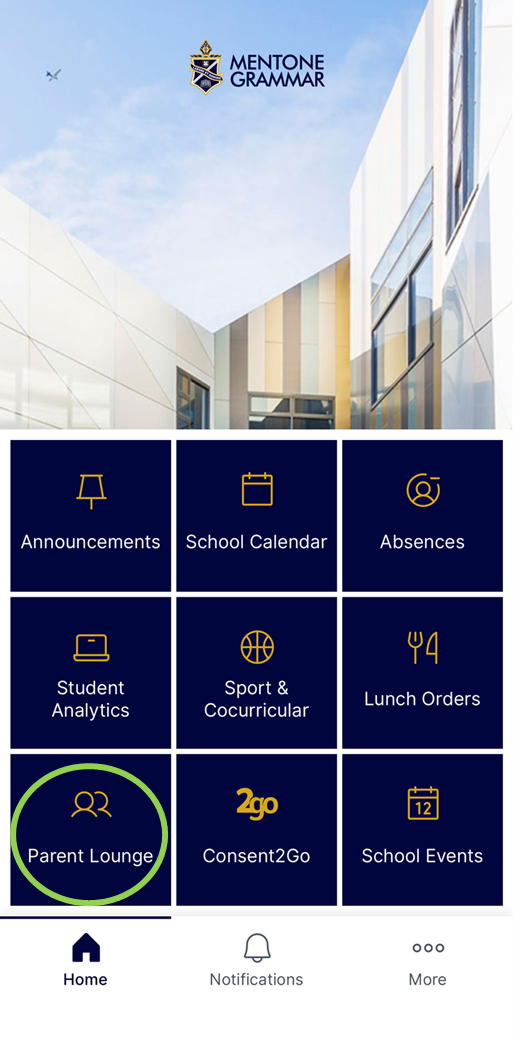
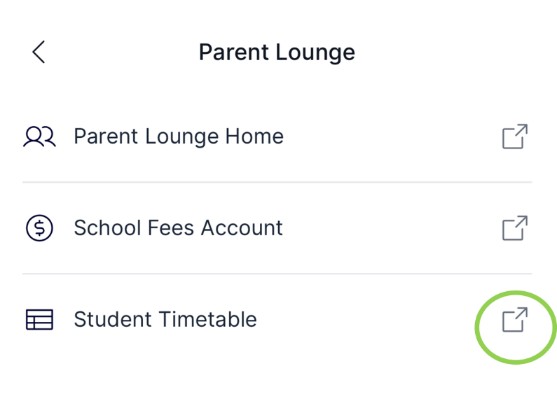
You can view your child’s timetable via the MyMentone app/Parent Lounge:
- Click on the Parent Lounge tile (green circle)
- Click on Student Timetable
- Once on the timetable page, use the down arrow beside the student name to toggle between children
NOTE: you may first be directed to the Parent Lounge login when accessing these pages.
- 8.30am | Period 1 | 90 minutes with Classroom Teacher focus on Literacy & Numeracy
- 10.00am | Period 2
- 11.00am | RECESS
- 11.30am | Period 3
- 12.30pm | Period 4
- 1.30pm | LUNCH – EATING TIME
- 1.45pm | LUNCH – PLAY TIME
- 2.15pm | Period 5
- 3.15pm | DISMISSAL (NOTE: Years 7–12 finish at 3.30pm)
- 8.30am | ROLL CALL (Mentor Class)
- 8.40am | Period 1
- 9.35am | Period 2
- 10.30am | RECESS
- 10.55am | Period 3
- 11.50am | Period 4
- 12.45pm | LUNCH
- 1.40pm | Period 5
- 2.35pm | Period 6
- 3.30pm | DISMISSAL (NOTE: F–Year 6 finish at 3.15pm)
Canvas is used as the School’s primary Learning Management System (LMS) for students in Years 7 – 12. Teachers use Canvas regularly to post class announcements, set and collect assignments, provide feedback, publish key assessment dates, and share learning resources to support classroom teaching.
Students are expected to check Canvas regularly to stay informed about upcoming deadlines, assessment requirements, and any important class updates.
While Canvas is a central source of information, it is not intended to replace students’ day-to-day organisation. For this reason, students are strongly encouraged to transfer key dates, deadlines, and reminders from Canvas into their physical school diaries.
Currently, parents of students in Years 7 – 9 have access to Canvas where they can find the same information as outlined above. The link below provides guidance on navigating Canvas and a range of key features.
Daily notices are shared with students at the start of each day. These include reminders, opportunities available, campus-related news and more.
They are also posted to the big screens around each Campus and on Campus-based Canvas pages.
Students from Years 5 – 12 are encouraged to check the daily notices in Canvas each day to ensure they have not missed any important information.